
How Docker and the Linux Kernel Isolate Your Agent, and Where They Don't
Namespaces, cgroups, seccomp, capabilities, LSMs. Five layers, twenty years of gaps.

The 450+ Door Hallway
The Linux kernel exposes over 450 syscalls to every 64-bit process. I counted. The kernel source for Linux 6.18 lists 457 callable entries for x86_64 (424 common plus 33 64-bit only). Think of each one as a door into the kernel. open, read, write, mmap, ioctl, mount, clone, ptrace. Every container on the host shares this same hallway.
For a traditional workload, this is fine. A web server uses maybe 40 or 50 of those doors. You know which ones because you wrote the code and you can profile it. The rest stay shut by default (or you can lock them with seccomp).
An agent is different. The agent writes code at runtime. It might call any of those 457 doors depending on what the LLM decides to do. You can’t predict which doors it will try because the code doesn’t exist until it runs.
The last post covered why that matters. This post covers what’s actually between the agent and the host. Linux gives you five layers of defense: namespaces, cgroups, capabilities, seccomp, and LSMs. Containers use all five. And container escapes still happen every year.
Let’s understand why.
Twenty Years of Bolted-On Isolation
Linux didn’t get isolation in one shot. It arrived in pieces over two decades, each piece solving a problem someone had at the time.
2002: mount namespaces arrive in Linux 2.4.19. For the first time, a process can have its own view of the filesystem. The clone flag is called CLONE_NEWNS, just “new namespace,” because nobody expected there’d be more than one kind.
2006: UTS and IPC namespaces land in Linux 2.6.19. Google engineers start work on “process containers” for resource accounting.
2008: PID namespaces and cgroups both arrive in Linux 2.6.24. Google’s “process containers” get renamed to “control groups” to avoid confusion. The goal is resource limiting, not security.
2009: network namespaces complete in Linux 2.6.29. Each process can now have its own network stack.
2013: Two big things happen. User namespaces finally merge in Linux 3.8 after years of debate. Now unprivileged processes can map to root inside a namespace. This is the one that still makes security people nervous. And Docker launches at PyCon in March. It takes all of the above, adds a nice CLI, and calls the combination “containers.” Containers aren’t a kernel feature. They’re a pattern built from independent mechanisms.
2016: Docker 1.10 ships with a default seccomp-bpf profile. Now you can filter which syscalls a container is allowed to make. Cgroups v2 also merges in Linux 4.5, bringing a unified hierarchy to replace the messy v1.
2021: Landlock LSM merges in Linux 5.13. A new approach to mandatory access control that doesn’t require root to configure.
2025: We’re still patching escape bugs in the mechanisms from 2006.
The point isn’t the dates. The point is that containers are six independent mechanisms bolted together over twenty years. No single designer. No unified threat model. No guarantee that the gaps between mechanisms are covered.
The escapes happen in those gaps.
The Eight Namespaces
Linux has eight namespace types. Each one gives a process a separate view of one kernel subsystem. Here’s what each one isolates, and what it doesn’t.
Mount (2002). Each container gets its own mount table. It sees its own filesystem tree. But the mount namespace doesn’t isolate filesystem content. And shared subtrees can propagate mounts between namespaces. The three mount-related CVEs in our list exploited this boundary.
PID (2008). Each container gets its own PID numbering. PID 1 inside the container maps to some other PID on the host. But the parent namespace can still see all child processes. And /proc must be explicitly remounted to reflect the namespace. If it isn’t, the container sees the host’s process list.
Network (2009). Each container gets its own network stack. Its own interfaces, routing tables, firewall rules, port space. But the kernel’s TCP/IP implementation is shared. And abstract unix sockets live in the network namespace, not the mount namespace. That’s the gap CVE-2020-15257 exploited.
User (2013). The controversial one. Maps UIDs between namespaces. Root inside the container maps to an unprivileged user on the host. This sounds great until you realize it exposes kernel interfaces that were previously root-only to any unprivileged user who creates a namespace. FUSE, nftables, BPF paths. CVE-2024-1086 (exploited in ransomware campaigns) required unprivileged user namespaces to reach the vulnerable nf_tables code. Ubuntu now restricts user namespace creation via AppArmor. Qualys found three bypasses in January 2025.
UTS (2006). Isolates hostname. Low-risk. Not interesting for agents.
IPC (2006). Isolates System V IPC objects. But POSIX shared memory via /dev/shm requires the mount namespace to isolate, not IPC.
Cgroup (2016). Virtualizes the view of /proc/self/cgroup. The container sees its cgroup as root. But this is only the view. The actual resource limits come from cgroups themselves. And as CVE-2024-21626 showed, a leaked file descriptor into the cgroup filesystem tunnels right through this namespace.
Time (2020). Offsets CLOCK_MONOTONIC and CLOCK_BOOTTIME. Does not isolate the wall clock (CLOCK_REALTIME). This one exists primarily for checkpoint/restore (CRIU) use cases. Some hardened kernel configurations disable it entirely, which is why you’ll see references counting seven or eight namespaces depending on the source.
The pattern across all eight is the same. Namespaces change what the process sees. They don’t change what the kernel does. The agent sees its own filesystem, its own PIDs, its own network interfaces. But every file open, every process signal, every network packet still goes through the same kernel code as every other container on the host.
The view is separate. The executor is shared. That’s the architectural fact that makes container escapes possible.
Cgroups: Resource Limits, Not Security Boundaries
Cgroups control how much of a resource a process can use. CPU time, memory, I/O bandwidth, number of processes. They’re good at preventing one container from starving another.
What they don’t do is control which operations a process can perform. An agent that stays within its memory limit and CPU budget can still call any syscall the kernel exposes. Cgroups don’t care about what the process does, only how much it consumes.
This distinction matters because people sometimes confuse resource isolation with security isolation. They’re different problems. A container hitting its memory limit gets OOM-killed. A container trying to mount the host filesystem either succeeds or fails based on the other mechanisms, not cgroups.
Cgroups can even become an attack surface themselves. CVE-2024-21626 (the “Leaky Vessels” escape from January 2024) exploited a leaked file descriptor into the cgroup filesystem. The mechanism designed to limit resources became the path out of the container.
Capabilities: Splitting Root Into 41 Pieces
There are 41 Linux capabilities. They split root’s powers into discrete privileges like CAP_NET_BIND_SERVICE (bind to ports below 1024), CAP_SYS_PTRACE (trace other processes), and CAP_SYS_ADMIN (the catch-all god capability that does way too many things).
Docker keeps 14 of the 41 by default. It drops the dangerous ones: SYS_ADMIN, SYS_PTRACE, SYS_MODULE, NET_ADMIN, BPF, and 22 more. A default container can’t load kernel modules, change system time, or create BPF programs. That’s helpful.
But look at what Docker keeps: CHOWN, DAC_OVERRIDE (bypass file permission checks), SETUID, SETGID, NET_RAW, KILL, MKNOD. These are the capabilities that let you change file ownership, bypass permissions, set user IDs, send raw packets, and send signals. An agent needs most of these to function. It changes file permissions, runs code as different users, makes network calls.
There’s a newer one worth knowing about. CAP_BPF was introduced in kernel 5.8 (2020) to take some pressure off CAP_SYS_ADMIN. Docker drops it by default. But modern observability tools and some agent workloads need it to function. Once you grant CAP_BPF, the process can attach BPF programs that read essentially any memory on the host. At that point, all the other isolation (namespaces, cgroups, seccomp) is moot. You’ve given the agent a window into everything.
The Devin compromise from Post 1 didn’t even need any of this. The agent ran chmod +x on a binary and executed it. That’s basic file operations. Every container allows them because every container needs them.
Capabilities help. But they’re permission checks on operations the kernel already exposes. They don’t shrink the attack surface. They add access control over it. And the pressure to grant more capabilities grows as agent workloads get more complex.
Seccomp-BPF: Filtering the Doors
This is the mechanism that can actually reduce the syscall attack surface. Seccomp-BPF lets you attach a BPF program to the syscall entry point. Every syscall the process makes gets filtered through it.
Docker’s default seccomp profile is technically a blocklist. The default action is SCMP_ACT_ALLOW, and the profile defines about 49 syscalls to block. Everything not on the blocklist is permitted. Out of 457 callable syscalls, that leaves over 400 open.
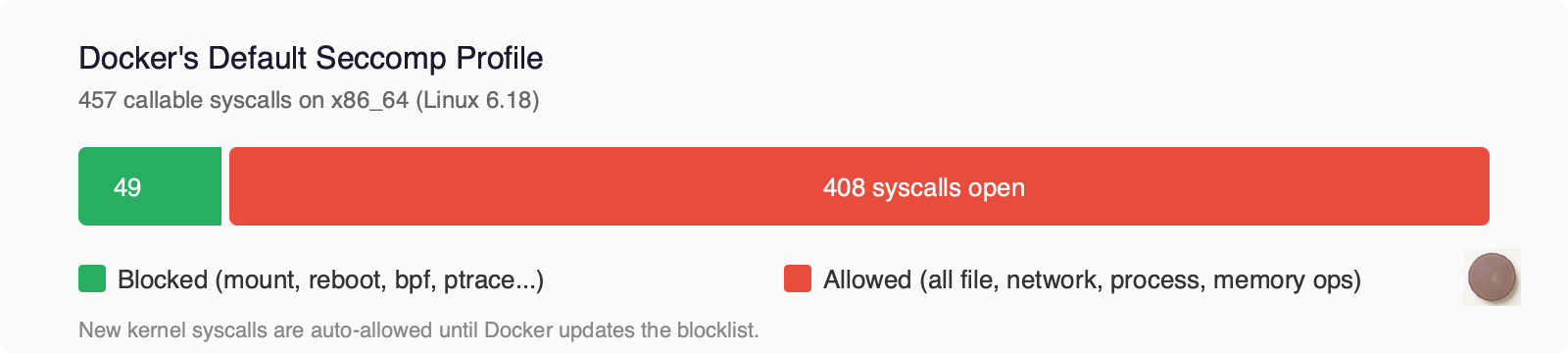
This matters more than it sounds. When a new syscall gets added to the kernel, it’s automatically allowed in every Docker container until someone updates the profile to block it. The kernel gains new attack surface faster than Docker’s blocklist gets updated. That’s the “bolt-on” lag in action.
The blocked list includes the obviously dangerous: mount, umount, pivot_root, reboot, kexec_load, bpf, ptrace, keyctl, userfaultfd, and clone with namespace flags. Things a web server doesn’t need.
What’s allowed is everything else. All file operations (open, read, write, stat, chmod, chown). All network operations (socket, bind, connect, send, recv). All process operations (fork, vfork, execve, kill). All memory operations (mmap, mprotect, brk). Over 400 syscalls left open.
Here’s the tension. Docker’s default profile was tuned for web applications. A web server needs a predictable set of syscalls. You can audit it, profile it, lock it down. An agent needs whatever syscalls the LLM-generated code requires. You can’t know in advance because the code doesn’t exist yet.
You could write a tighter profile. But how tight? Lock it too much and the agent breaks. Leave it too loose and you haven’t improved security.
Think about what this means in practice. A web server makes the same syscalls on every request. You can strace it during testing, capture every syscall it makes, and build a seccomp profile that covers 100% of its behavior. Done once, valid forever.
An agent is different every time. Ask it to fix a test and it calls one set of syscalls. Ask it to set up a web server and it calls a different set. Ask it to analyze a CSV and it’s different again. The code changes on every invocation, so the syscall footprint changes too.
You can’t build a single seccomp profile that covers all possible agent tasks without making it so permissive it’s useless. And Docker’s default profile is already that permissive. Over 400 syscalls allowed, specifically to avoid breaking things.
That permissiveness is exactly why container escapes keep working. The attack surface stays wide because narrowing it breaks things. Security wants a narrow profile. Capability wants a wide one. For traditional workloads, you find a middle ground based on the known code. For agents, there’s no known code to base it on.
LSMs: Landlock, AppArmor, SELinux
Linux Security Modules add mandatory access control on top of the discretionary access control (file permissions) that Linux already has.
AppArmor confines programs by path. You write a profile that says “this process can read /etc/ssl/ but not /home/.” Docker uses AppArmor profiles on Ubuntu by default.
SELinux confines by labels. Every file, process, and socket gets a security label. Policies define which labels can interact. Docker uses SELinux on RHEL and Fedora.
Both have the same problem for agent workloads: they assume you know what the application does. You write the profile based on the application’s known behavior. Agents don’t have known behavior.
Landlock is the newer approach and potentially the most interesting for agents. It’s now at ABI version 7 (Linux 6.15, 2025). It’s unprivileged (no root required), stackable (you can layer restrictions), and self-restricting (a process can only tighten its own rules, never loosen them).
What Landlock can restrict: filesystem access (read, write, execute, create, delete, rename, truncate), TCP network (bind and connect), abstract unix socket connections, and cross-domain signals. As of v7, it also logs denied requests.
What it can’t: UDP or any non-TCP protocol. File metadata operations like chmod, chown, stat. The /proc and /sys pseudofilesystems. Syscalls themselves.
An agent runtime could apply a Landlock policy per-task. “For this task, you can read and write in /workspace/project-a and connect to TCP port 443. Nothing else.” That’s a tighter boundary than seccomp can give you for filesystem access, and it doesn’t require root to set up.
The gaps are real though. No UDP means no DNS lookups through Landlock alone. No /proc restriction means an agent can still read /proc/self/environ (where many secrets live). You’d combine Landlock with seccomp and namespaces for a complete picture.
But Landlock is the first mechanism that might adapt to the agent use case. You restrict resources, not operations. You don’t need to know what the code will do. You just need to know what it should have access to. Worth watching closely.
Anatomy of an Escape
Here’s where it all comes together. Let’s take each container escape CVE from the last six years and trace it to the specific mechanism that failed.
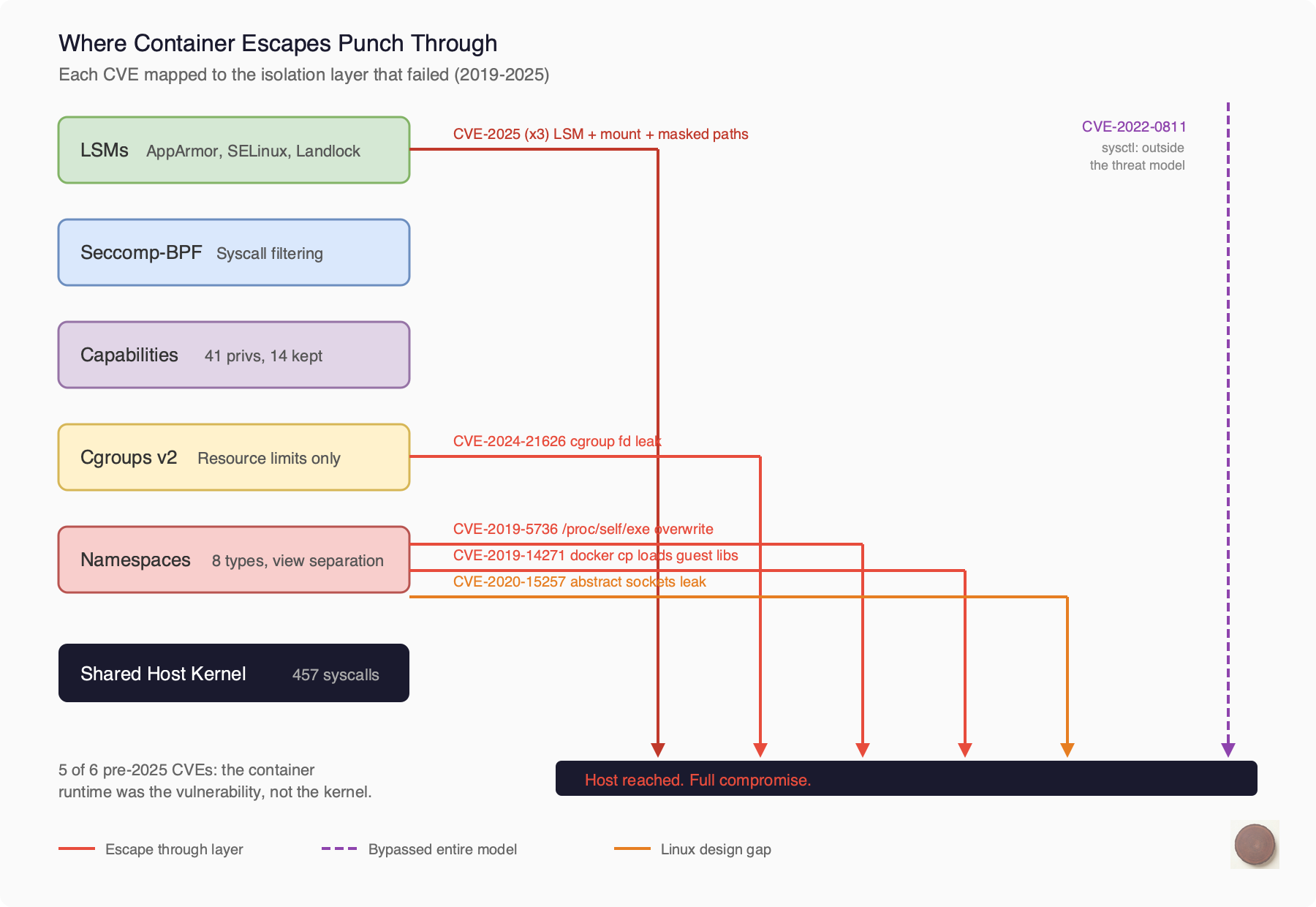
2019, CVE-2019-5736 (runc). During runc exec, the binary enters the container via /proc/self/exe. A malicious container could race against this and overwrite the host’s runc binary on disk. Next time anyone ran a container, the attacker’s code executed as root. The mechanism that failed: process isolation. The tool that sets up the boundary must itself cross that boundary to do its job.
2019, CVE-2019-14271 (Docker). When you ran docker cp to copy files from a container, the helper process chrooted into the container’s filesystem and then loaded libnss libraries. From the container’s filesystem. With host root privileges. Plant a malicious libnss_files.so in your container and wait for someone to run docker cp. The mechanism that failed: mount namespace boundary. The host tool loaded code from the guest.
2020, CVE-2020-15257 (containerd). containerd exposed its shim API on abstract unix sockets. Here’s the thing about abstract sockets in Linux: they live in the network namespace, not the mount namespace. Any container running with --net=host could connect to the shim API, start privileged containers, and access the host filesystem. This is a fundamental Linux design gap. Abstract sockets bypass mount namespace isolation.
2021, CVE-2021-30465 (runc). During container startup, runc checks that mount destinations are safe, then mounts them. Between the check and the mount, an attacker swaps a directory for a symlink pointing to the host filesystem. Classic TOCTOU race. The mechanism that failed: mount namespace setup. The filesystem is mutable during the moment it’s being secured.
2022, CVE-2022-0811 (CRI-O). CRI-O let you set kernel parameters via Kubernetes pod annotations. The validation didn’t distinguish between namespace-scoped sysctls (safe) and host-global ones (dangerous). Set kernel.core_pattern to |/path/to/your/script, trigger a core dump, and the kernel executes your script on the host. The mechanism that failed: nothing in the isolation stack. This was a parameter that wasn’t in the threat model at all.
2024, CVE-2024-21626 (runc). The “Leaky Vessels” escape. During WORKDIR processing, runc leaked a file descriptor pointing to /sys/fs/cgroup on the host. A crafted Dockerfile with WORKDIR /proc/self/fd/7 would set the container’s working directory to the host filesystem via the leaked FD. Full host access. The mechanism that failed: file descriptor management. One leaked handle tunneled through all five layers of isolation.
2025, CVE-2025-31133 and two more (runc). Three independent escapes disclosed together. Masked path abuse (symlink /dev/null to procfs files), a /dev/console mount race, and an LSM bypass through /proc/self/attr. Multiple mechanisms failing simultaneously.
Look at the pattern across all of these.
These aren’t bugs in the kernel primitives. Namespaces work as designed. Cgroups work as designed. Seccomp works as designed. The escapes happen in the gaps between them. The interactions. The setup sequences. The assumptions one mechanism makes about what another mechanism handles.
The mount namespace assumes /proc is safely mounted. The cgroup namespace assumes file descriptors don’t leak across boundaries. The process isolation boundary assumes that host tools don’t load libraries from the container. Each assumption is reasonable on its own. Together, they leave cracks.
And in five of six pre-2025 CVEs, the vulnerability wasn’t in the kernel at all. It was in the container runtime. runc, containerd, CRI-O, Docker. The code that sets up the isolation is itself the attack surface. It has to cross the boundary to build it, and that crossing is where things go wrong.
Why This Is Worse for Agents
Everything above is true for any container workload. But agents make every problem harder.
Traditional workloads run known code. You can strace a web server during testing, capture every syscall it makes, and build a seccomp profile that covers 100% of its normal behavior. Done once, valid forever (until you update the software).
Agent workloads run unknown code. Run the same agent on two different tasks and you’ll see different syscall patterns. One task might need to compile code (execve, clone, pipe). Another might need to download files (socket, connect, sendto). A third might need to access a database (different socket calls, different file operations).
You can’t build a single seccomp profile that covers all possible agent tasks without making it so permissive it’s useless.
The attacker model is different too. To exploit a container escape against a traditional workload, you need to compromise the supply chain. Get a malicious image built and deployed. For an agent, you just need prompt injection. Put a malicious instruction in a document the agent reads. The agent generates the exploit code for you.
What Sits on the Other Side
Five layers of defense. All sharing one kernel. All built independently over twenty years. The escapes happen in the gaps between layers, and agents make those gaps wider because you can’t predict what the code will do.
The question this naturally raises: what if the kernel wasn’t shared?
Firecracker gives each workload its own kernel and reduces the shared surface to ~25 KVM hypercalls. gVisor intercepts syscalls in userspace and reimplements them without touching the host kernel at all. Cloud Hypervisor adds GPU support and dynamic resource scaling to the microVM model.
That’s what we’ll dig into next. Not to declare one approach better than another. To understand what each one trades and what each one gains when the workload is an AI agent generating code you’ve never seen.
Open Questions
How much does the syscall profile of an agent vary across tasks? Is there a stable “core” set that covers 90% of cases?
Can Landlock’s per-task filesystem scoping help for agent workloads? Has anyone tried?
Is there a principled way to decide between “tight seccomp + risk of breaking” and “loose seccomp + larger attack surface”?
Do the big container platforms (ECS, GKE, AKS) add any agent-specific hardening beyond the default Docker profile?
About This Series
This is post two of a deep dive into AI agent isolation. The first post covered why agent isolation is a different problem. This one went inside the Linux kernel to understand what containers actually give you.
Next up, we’re looking at the three architectures that take a fundamentally different approach: Firecracker, Cloud Hypervisor, and gVisor. Same question, three different answers.
Sources
Kernel and Namespaces
Linux syscall tables:
https://syscalls.mebeim.net/
x64 syscall reference:
https://x64.syscall.sh/
namespaces(7) man page: https://man7.org/linux/man-pages/man7/namespaces.7.html
capabilities(7) man page: https://man7.org/linux/man-pages/man7/capabilities.7.html
Docker Security
Docker seccomp docs: https://docs.docker.com/engine/security/seccomp/
Docker default seccomp profile (Moby source): https://github.com/moby/moby/blob/master/profiles/seccomp/default.json
Docker default capabilities: https://dockerlabs.collabnix.com/advanced/security/capabilities/
Landlock
Landlock kernel docs: https://docs.kernel.org/userspace-api/landlock.html
Landlock ABI changelog: https://landlock.io/news/5/
CVE References
CVE-2019-5736 (runc /proc/self/exe): https://nvd.nist.gov/vuln/detail/CVE-2019-5736
CVE-2019-14271 (Docker cp): https://unit42.paloaltonetworks.com/docker-patched-the-most-severe-copy-vulnerability-to-date-with-cve-2019-14271/
CVE-2020-15257 (containerd abstract sockets): https://research.nccgroup.com/2020/12/10/abstract-shimmer-cve-2020-15257-host-networking-is-root-equivalent-again/
CVE-2021-30465 (runc symlink race): https://github.com/opencontainers/runc/security/advisories/GHSA-c3xm-pvg7-gh7r
CVE-2022-0811 (CRI-O cr8escape): https://www.crowdstrike.com/en-us/blog/cr8escape-new-vulnerability-discovered-in-cri-o-container-engine-cve-2022-0811/
CVE-2024-21626 (runc Leaky Vessels): https://snyk.io/blog/leaky-vessels-docker-runc-container-breakout-vulnerabilities/
CVE-2025-31133/52565/52881 (runc 2025): https://www.sysdig.com/blog/runc-container-escape-vulnerabilities
User Namespace Controversy
Qualys bypasses of Ubuntu restrictions: https://blog.qualys.com/vulnerabilities-threat-research/2025/03/27/qualys-tru-discovers-three-bypasses-of-ubuntu-unprivileged-user-namespace-restrictions
CVE-2024-1086 (nf_tables via user ns): https://www.crowdstrike.com/en-us/blog/active-exploitation-linux-kernel-privilege-escalation-vulnerability/
Container Security Fundamentals
Datadog container security series: https://securitylabs.datadoghq.com/articles/container-security-fundamentals-part-3/
CNCF runc breakout overview: https://www.cncf.io/blog/2025/11/28/runc-container-breakout-vulnerabilities-a-technical-overview/